Admin - Why a salary adjustment is not reflecting correctly in the current payrun?
Last updated: April 29, 2026
If a salary change was made after the payroll cutoff date, it will not automatically be included in the current pay run. The system calculates payroll based on the data available at the cutoff point.
To include the change in the current pay run:
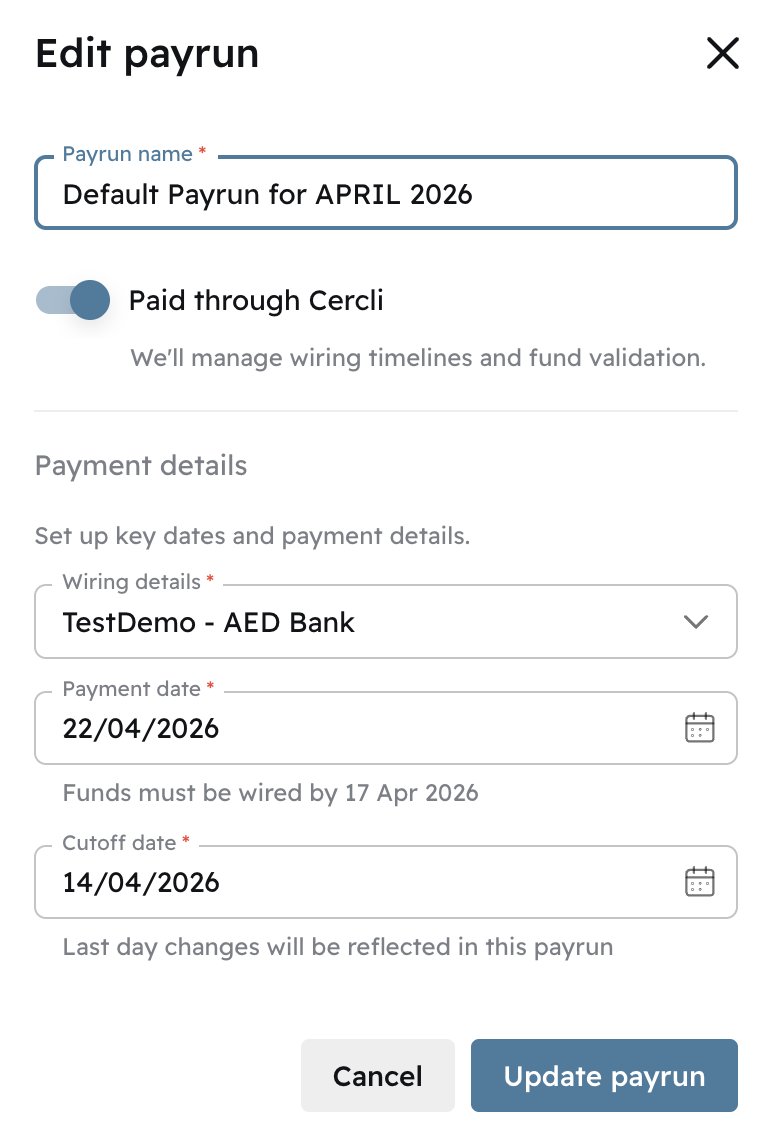
Check the payroll cutoff date for the current cycle
If the adjustment was made after the cutoff, you will need to update the cutoff date to include it
Go to the relevant pay run and click Edit Pay Run
Update the cutoff date and reprocess the payments to reflect the change
Note: adjusting the cutoff date may affect other changes made after the original cutoff date, so review the full pay run before confirming.

How are arrears for a mid-month joiner reflected in payroll?
Cercli now automatically calculates arrears based on your entity’s proration strategy and adds them to the next payroll.
A team member's salary breakdown doesn't match the expected basic and allowances. Is this because of their joining date?
When a team member joined mid-month, their salary components (basic, housing and other allowances) will appear lower than the full monthly amounts. Cercli automatically prorates the salary based on the employee's start date and your entity's selected proration method.
My proration calculation seems off. Why is the system counting fewer days than expected?
The result depends on which proration method is selected for your entity. Each method calculates differently:
Calendar days: Monthly salary divided by the actual number of calendar days in the current month, multiplied by the days worked.
Fixed 30-day: Monthly salary divided by 30, multiplied by the calendar days worked. Every month is treated as having exactly 30 days regardless of its actual length. For example, if an employee joins on the 27th of a 31-day month, the system counts 4 days (27, 28, 29, 30) and excludes the 31st.
Annualised working days: Monthly salary multiplied by 12 to get the annual salary, divided by the total working days in the year (260 for a 5-day week, 312 for a 6-day week), then multiplied by the number of days worked that month.
Annualised (365): Monthly salary multiplied by 12, divided by 365 days, then multiplied by the calendar days worked.
If the result does not match your expectation, check which method is set for your entity and confirm it aligns with your intended calculation. You can change the proration method in your entity's calculation settings.
